
Our Top Picks
 PowerA Advantage Wired Controller for Xbox Series X|S6.14 x 4.21 x 2.56 inches0.6 poundsCheck on Amazon
The best Xbox controller deal for most people in 2026 is the Xbox Wireless Controller in Carbon Black. It is the only pad in this roundup that pairs natively with every Xbox console, a Windows PC and cloud-gaming devices without a dongle or a workaround, and it runs on two AA batteries you can swap in about ten seconds when the low-battery warning appears. It suits anyone who wants one controller that works everywhere, who values repairability and battery flexibility over back buttons, and who does not want to think about drivers or receivers. If price is the deciding factor, the PowerA Advantage Wired (Fortnite Glow) is the budget pick because it is one of the few pads at that tier with hall-effect thumbsticks and mappable back buttons. If you play ranked shooters and want the sharpest wired link plus wireless freedom on PC, the GameSir G7 Pro is the premium choice. Everything below is compared on compatibility, battery life, stick feel, back buttons, durability and long-session comfort, because those six factors decide whether a controller is still pleasant to use in month eighteen.
Top 3 Picks
Best overall: Xbox Wireless Controller | Carbon Black
It wins on the boring things that matter: native pairing with Xbox consoles, Bluetooth for PC and mobile, a 3.5 mm headset jack, textured grips and triggers, and a battery system you control because it takes standard AAs. Xbox rates it at up to about 40 hours on a pair of alkaline batteries, and if you would rather not buy disposables you can drop in a rechargeable pack or two rechargeable AAs. It has no back buttons and no trigger stops, so competitive players will look past it, but for a single controller that covers a whole household it is the safest buy on this list.
Best budget: PowerA Advantage Wired Controller (Fortnite Glow)
At the budget tier most pads still use conventional potentiometer sticks, which is exactly where drift starts. The Advantage line moves to hall-effect thumbsticks, adds two mappable buttons on the back and three-way trigger locks, and does it on a cable so there is no battery to charge, replace or curse. The Fortnite Glow finish is loud, and that is the only real compromise: if you want the same internals in a quieter shell, PowerA sells other Advantage colourways. For drift insurance at the lowest price, this is the pick.
Best premium: GameSir G7 Pro
The G7 Pro is the most flexible controller here. It runs wired on Xbox Series X|S and Xbox One for the lowest-latency link, and the listing states it also works wirelessly with PC and Android, so the same pad can follow you between a console and a handheld or tablet setup. It uses TMR sticks, which are the newer magnetic-sensing design, plus back buttons and trigger stops. You pay a premium price for that versatility, and on Xbox you are still tethered, but nothing else in this list covers both console and PC as neatly.
Quick Comparison
| Product | Best for | Connection and power | Sticks and extra inputs | Price tier |
|---|---|---|---|---|
| Xbox Wireless Controller | Carbon Black | One pad that works on every Xbox and PC | Xbox Wireless to consoles, Bluetooth to PC/mobile; 2× AA, up to ~40 h per pair | Standard sticks, share button, 3.5 mm jack, no back buttons | Premium |
| SZDILONG Wireless 2.4 GHz Controller | Cheap wireless for PC and Steam | 2.4 GHz with USB receiver; built-in rechargeable battery (single-digit to low-double-digit hour class) | Standard sticks, dual rumble, no back buttons | Mid-range |
| ZHCWM Wireless Xbox Controller | A first spare wireless pad on a tight budget | 2.4 GHz class wireless for Xbox One, Series X|S and PC; rechargeable battery | Standard sticks, dual rumble, no back buttons | Budget |
| PowerA Advantage Wired (Fortnite Glow) | Drift-resistant sticks and back buttons for very little money | Wired USB, no battery, unlimited runtime | Hall-effect sticks, 2 mappable back buttons, 3-way trigger locks, 3.5 mm jack | Budget |
| 8Bitdo Ultimate C Wired | Simple, sturdy wired play for PC and indie titles | Wired USB, no battery | Drift-resistant stick class, 3.5 mm jack, no back buttons | Budget |
| Hyperkin Xenon Wired | Players who miss the Xbox 360 shell | Wired USB, plug and play, no battery | 360-style shell and stick layout, no back buttons | Mid-range |
| GameSir G7 Pro | Competitive hybrid between Xbox and PC/Android | Wired on Xbox; wireless on PC and Android per listing; 1,000 Hz class polling wired | TMR sticks, back buttons, trigger stops, 3.5 mm jack | Premium |
| GameSir G7 SE | Mid-price wired tournament play | Wired USB-C, no battery; 1,000 Hz class polling | Hall-effect sticks, 2 back buttons, trigger stops, 3.5 mm jack | Mid-range |
| PowerA Wired Controller (Black) | Cheap second pad for couch co-op | Wired USB, no battery | Standard sticks, 3.5 mm jack, no back buttons | Budget |
| FLYDIGI Vader 5S | Maximum buttons and trigger tuning | Wired USB for Xbox Series X|S, Xbox One, Windows | Extra face buttons and back inputs, adjustable triggers, magnetic-sensing stick class | Premium |
| NINIFEI Wireless Xbox Controller | Xbox One owners wanting mid-price wireless | Wireless with receiver class pairing, rechargeable battery | Standard sticks, dual rumble, no back buttons | Mid-range |
| Xbox Wireless Controller X25 Special Edition | Collectors and gift buyers | Xbox Wireless plus Bluetooth; 2× AA or rechargeable pack, up to ~40 h per pair | Standard sticks, textured grip, share button, no back buttons | Premium |
How We Chose
This roundup is built from published specifications, manufacturer documentation and the way each controller is positioned in its own listing, not from hands-on sessions. The first filter was compatibility: a pad has to state clearly which Xbox generations, PC operating systems or handhelds it supports, and how it connects, because “wireless” means three different things in this category and buyers get burned by that ambiguity more than by any other spec. The second filter was the presence of a genuinely useful feature at its price tier, such as hall-effect or TMR sticks, mappable back buttons or trigger stops. The third was category fit, so a nostalgia pad and a tournament pad are judged against different standards. The fourth was upgrade path and ownership cost: battery type, whether batteries are replaceable, whether replacement parts and thumbstick caps exist, and how long the pad is likely to stay comfortable in a long session. Controllers that only differentiated themselves on appearance, or that could not be verified as compatible with the platforms they claimed, were left out entirely.
1. Xbox Wireless Controller | Carbon Black – Best for most Xbox players
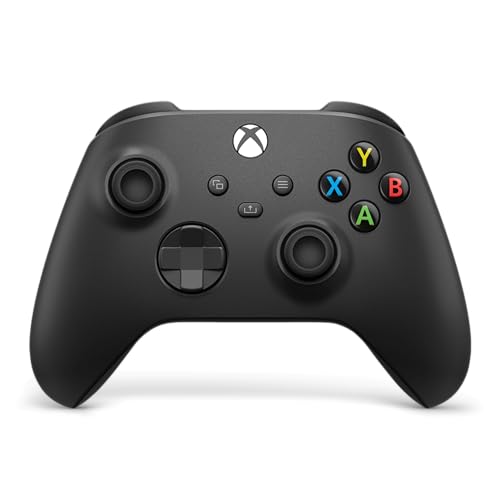
XBOX Wireless Gaming Controller | Carbon Black
Chosen because it specifies Carbon Black.
View on AmazonThis is the reference point for the whole category. It suits the player who owns a Series X|S or an Xbox One, occasionally plays on a Windows laptop, sometimes streams to a phone or tablet, and wants a single controller that does all of it without a receiver dongle. It also suits households where more than one person plays, because the AA battery system means nobody ever waits for a charge cycle; you keep a spare pair in a drawer and swap them mid-session. The Carbon Black version is the plainest finish in the range, which is also why it is usually the easiest to find.
- Connection: Xbox Wireless to Xbox consoles; Bluetooth to Windows, Android, iOS and some smart TVs; USB-C for wired play and charging
- Power: two AA batteries (alkaline or rechargeable) or the official rechargeable battery pack
- Published runtime: Xbox rates it at up to roughly 40 hours on a pair of AAs
- Ports: USB-C and a 3.5 mm stereo headset jack
- Controls: textured grip on the bumpers, triggers and rear; share button; hybrid D-pad; no back buttons or trigger stops
- Weight class: mid-weight, roughly 280 g with two AAs installed
What it does well is disappear. Pairing is a single button press, the analog sticks are smooth and familiar, the D-pad is precise enough for fighting games, and the textured surfaces help in long sessions where your hands get warm. The share button is genuinely useful on console, and the headset jack works with any standard wired headset, so you do not need an adapter. Battery flexibility is the underrated advantage: a built-in battery pad becomes a paperweight for an hour while it charges, whereas this one is playable again in seconds.
Pros
- Native pairing on every Xbox console plus Bluetooth for PC and mobile, no dongle required
- Swappable AA batteries mean effectively zero downtime
- Widely supported, so replacement grips, thumbstick caps and battery packs are easy to find
- Comfortable mid-weight shape that suits most hand sizes
- USB-C wired mode for zero-latency play and charging at the same time
Cons
- No back buttons or trigger stops, so competitive players will outgrow it
- Conventional analog sticks will eventually drift after heavy use
- Premium price tier for what is functionally the baseline controller
- Disposable alkaline AAs get expensive if you never switch to rechargeables
Against the X25 Special Edition further down this list, the Carbon Black is the value play: the X25 shares the same internal design and adds a distinct finish and textured grip, which is worth paying for only if you want the look. Against the GameSir G7 SE, the trade is clear. The G7 SE costs less in most market windows, runs wired only, and gives you hall-effect sticks, back buttons and trigger stops; the official pad gives you native wireless and battery freedom instead. If you mostly play ranked shooters and sit close to your screen, the GameSir is the better tool. If you want one controller for the living room, this is the one.
2. SZDILONG Wireless 2.4GHz Controller – Best for cheap wireless on PC and Steam

SZDILONG Wireless 2.4GHz Controller for Xbox, Xbox One Series X|S,Steam,PC
Chosen because it specifies Xbox One Series X and Steam.
View on AmazonThis is a PC-first wireless pad that also states support for Xbox One, Xbox Series X|S, Steam and Windows. It suits the player who does most of their gaming on a desktop or laptop, wants to sit back without a cable, and does not want to spend premium money to do it. It also suits a secondary setup: a living-room PC, a Steam library on a TV, or a laptop hooked to a monitor where a dongle-based pad is simpler than managing Bluetooth pairing every time.
The listing states 2.4 GHz wireless, which in practice means a bundled USB receiver rather than native Xbox Wireless. That distinction matters: native Xbox Wireless is licensed technology, so third-party pads at this tier generally ship a dongle and connect to a console through it. It works, and latency over 2.4 GHz is usually good, but the receiver becomes the single most important piece of plastic in your setup.
- Connection: 2.4 GHz wireless with a USB receiver, stated for Xbox One, Series X|S, Steam and PC
- Power: built-in rechargeable battery, typically a single-digit to low-double-digit hour runtime in this class
- Charging: USB cable charging while idle
- Controls: standard layout with dual rumble motors, no back buttons
- Build: lightweight plastic shell, entry to mid-tier materials
The strengths are straightforward. Wireless freedom at a mid-range price is the main one, and a rechargeable battery removes the ongoing cost of AAs entirely. The rumble is present and functional, the sticks are adequate for most genres, and because it is light, long sessions do not fatigue your wrists as quickly as a heavier premium pad might. It is also a low-risk way to test whether wireless matters to you before spending premium money on an official pad.
Pros
- Wireless play at a mid-range price, no premium premium
- Built-in rechargeable battery means no ongoing AA spend
- Broad stated compatibility across Xbox consoles, Steam and Windows
- Light enough for long, casual sessions
- Simple setup: plug the receiver in and play
Cons
- The receiver is a small part that is easy to lose or break, and it is required
- Battery is not user-replaceable, so runtime fades as the cell ages
- No back buttons, trigger stops or hall-effect sticks
- Entry-level materials will not feel as solid as an official pad
- Wireless method should be confirmed on the listing before buying for a console
Compared with the ZHCWM pad below, this one has the broader platform claim, including Steam, and the same basic architecture. Compared with the Xbox Wireless Controller, you trade native pairing, AA flexibility and long-term parts availability for a lower price and a rechargeable battery. If your setup is a PC and a monitor and you dislike cables, the SZDILONG is a sensible mid-range buy. If you want one controller that will still be supported in five years, the official pad wins.
3. ZHCWM Wireless Xbox Controller – Best for a first spare wireless pad on a tight budget

ZHCWM Wireless Xbox Controller for Xbox One, Series X|S, PC,Black
Chosen because it specifies Series X and Black.
View on AmazonThis is the budget end of wireless. It suits the player who wants a second controller for a sibling, a partner or a guest, and who does not want to spend premium money on a pad that gets used twice a month. It also suits someone testing whether a wireless setup works in their room before committing real money to it. The listing states wireless support for Xbox One, Xbox Series X|S and PC in a black finish.
As with any budget wireless pad, the connection method is the thing to verify. Native Xbox Wireless is a licensed technology, so pads at this price generally pair through a bundled receiver rather than directly. That is fine for casual use, but it means the pad lives or dies with its dongle.
- Connection: wireless with receiver-class pairing, stated for Xbox One, Series X|S and PC
- Power: built-in rechargeable battery
- Controls: standard dual-stick layout with rumble, no back buttons
- Finish: plain black shell
- Price tier: budget
The case for it is simple arithmetic. If you need three controllers for a household of casual players, buying three premium pads is a lot of money for the number of hours they actually see. Three budget wireless pads cover the same number of players for a fraction of the outlay, and if one dies, you replace one rather than resenting the whole purchase. The rechargeable battery also means no AA shopping, which matters more than people expect when a pad is used irregularly; disposables left in a drawer for months are a nuisance.
Pros
- Lowest entry point to wireless play in this roundup
- Rechargeable battery, so no recurring AA cost
- Stated compatibility with Xbox One, Series X|S and PC
- Cheap enough to buy as a spare or a guest pad without guilt
- Light shell, comfortable for short sessions
Cons
- Standard sticks will drift with heavy use, and there is no hall-effect option at this tier
- Non-replaceable battery limits the pad’s useful life
- No back buttons, trigger locks or extra inputs
- Receiver-dependent wireless should be confirmed before buying for a console
- Build materials and stick feel are noticeably below the official pad
Against the SZDILONG pad above, the ZHCWM is the cheaper sibling with a narrower platform claim and no Steam mention. Against the PowerA Wired Controller in Black, you are choosing between wireless convenience and drift-resistant longevity at a similar budget: the PowerA is wired and basic but licensed and easy to replace, while this pad is wireless but built to a shorter service life. Buy the ZHCWM if the cable is the thing that bothers you. Buy the PowerA if you want the pad that is still working in three years.
4. PowerA Advantage Wired Controller (Fortnite Glow) – Best budget pad with hall-effect sticks and back buttons
PowerA Advantage Wired Controller for Xbox Series X|S - Fortnite Glow, gamepad, hall effect thumbsticks, gaming controller, USB-C, Works with Xbox One, Officially Licensed
Chosen because it specifies Fortnite Glow and gamepad.
View on AmazonThis is the best value on the list for anyone who cares about stick longevity. It suits the player on a tight budget who has already been burned by drift on a cheap pad, and it suits the competitive player who wants back buttons but cannot justify a premium wired controller. Because it is wired, it also suits anyone who games at a desk and would rather never think about charging again.
The Advantage line is an officially licensed Xbox accessory family, which matters for one practical reason: licensed pads are guaranteed to work on the console without a dongle, and they follow Microsoft’s accessory requirements. The Fortnite Glow version is a bold finish with a light-up design, and PowerA sells the same internals in plainer colourways if that aesthetic is not for you.
- Connection: wired USB, plug and play on Xbox Series X|S, Xbox One and Windows
- Sticks: hall-effect thumbsticks, which sense position magnetically rather than through a wearing carbon track
- Extra inputs: two mappable advanced gaming buttons on the back
- Triggers: three-way trigger locks to shorten trigger travel
- Audio: 3.5 mm stereo headset jack
- Power: none required, unlimited runtime
The combination of hall-effect sticks and back buttons at a budget price is genuinely unusual, and it is the reason this pad appears in the top three. Trigger locks are the other quiet win: shortening trigger travel from a full squeeze to a short tap changes how quickly you can fire in shooters, and it is a feature normally reserved for premium pads. Wired operation also removes the single most common failure point in wireless controllers, the battery.
Pros
- Hall-effect sticks at a budget price, which is the single best drift defence available
- Two mappable back buttons for face-button actions without leaving the right stick
- Three-way trigger locks for faster firing in shooters
- Officially licensed, so console compatibility is not a gamble
- No battery to charge, replace or lose capacity over time
Cons
- Wired only, so you are tethered and the cable adds drag on a low desk
- Only two back buttons, where premium pads offer more inputs
- The glow finish is polarising and not ideal for shared living spaces
- Stick tension and shape are less refined than premium tournament pads
- Cable is a wear item; strain at the connector is the first thing to fail on any wired pad
Compared with the plain PowerA Wired Controller further down this list, the Advantage is the upgrade worth making. For a modest step up you gain hall-effect sticks, back buttons and trigger locks, which is a lot of function for the difference. Compared with the GameSir G7 SE, the Advantage gives up polling-rate headroom and a USB-C connection but costs less, which makes it the right choice if your budget is genuinely tight. If you can stretch, the G7 SE is the more capable pad.
5. 8Bitdo Ultimate C Wired Controller – Best for simple, sturdy wired play

8Bitdo Ultimate C Wired Controller for Xbox, Dark Gray
Chosen because it specifies Dark Gray.
View on Amazon8Bitdo built its reputation on retro-styled pads with better-than-expected build quality, and the Ultimate C Wired brings that sensibility to the Xbox form factor in a Dark Gray finish. It suits the player who wants a wired controller that simply works, plays a lot of indie, platform and fighting games, and does not need back buttons or trigger stops cluttering the shell. It also suits anyone with smaller hands, because the Ultimate C line tends toward a compact, light shell rather than a chunky premium one.
- Connection: wired USB, stated for Xbox Series X|S, Xbox One and Windows
- Sticks: drift-resistant magnetic-sensing stick class, as used across 8Bitdo’s current Ultimate line
- Audio: 3.5 mm stereo headset jack
- Extra inputs: none, standard layout only
- Power: none required
- Finish: Dark Gray
The appeal is restraint. There is nothing to configure, nothing to charge and nothing to lose. The stick feel is smooth and consistent, the D-pad is a strong point for 8Bitdo generally, and the shell is light enough that a three-hour session does not leave your hands aching. For 2D games, that combination is often better than a heavier premium pad with extra paddles you will never map.
Pros
- Drift-resistant stick design at a budget price
- Compact, light shell that suits smaller hands and long 2D sessions
- Simple plug-and-play setup with no software required
- 8Bitdo’s build quality is a consistent strength across its range
- No battery, so no runtime decay over the pad’s life
Cons
- No back buttons, trigger stops or extra inputs
- Wired only, which rules it out for couch play at distance
- Remapping support varies between 8Bitdo models, so verify before buying if that matters
- Less suited to shooters than pads with trigger locks and back paddles
- Compact shell can feel small for players with large hands
Compared with the PowerA Advantage, the choice comes down to features versus simplicity. The Advantage adds back buttons and trigger locks for roughly similar money; the Ultimate C counters with a lighter, more refined feel and a D-pad that is better for fighting and platform games. If you play shooters, take the Advantage. If you play everything else, the Ultimate C is the more pleasant controller to hold. Compared with the Hyperkin Xenon below, it is the modern layout rather than the 360 throwback.
6. Hyperkin Xenon Wired Controller – Best for players who miss the Xbox 360 pad

Hyperkin Xenon Wired Controller for XBOX Series X|S, XBOX One & Windows 10|11, PC, Plug and Play Gaming Gamepad with 3.5MM Audio Jack, Impulse Triggers - Black - Officially Licensed
Chosen because it specifies XBOX One & Windows 10 and Plug and Play Gaming Gamepad with 3.5MM Audio Jack.
View on AmazonThe Xenon is a deliberate throwback. It suits the player who grew up on the Xbox 360 controller and has never fully adjusted to the modern Xbox shape, and it suits anyone who wants a wired pad for Xbox Series X|S, Xbox One or Windows 10 and 11 with no configuration at all. It is also a reasonable pick for emulation and older PC games, where the classic layout feels natural.
- Connection: wired USB, plug and play on Xbox Series X|S, Xbox One, Windows 10 and 11
- Shell: Xbox 360-style silhouette with the classic coloured face buttons and offset stick layout
- Power: none required
- Extra inputs: none beyond the standard layout
- Price tier: mid-range, which reflects the tooling and the nostalgia factor rather than extra features
The reason to buy it is ergonomic memory. The 360 controller is still considered by many players to have one of the best shapes ever made, and if that shape is what your hands expect, no amount of modern refinement fully replaces it. Wired operation keeps latency low and removes battery concerns, and plug-and-play means it works the moment you plug it in, on console or PC.
Pros
- The classic Xbox 360 shape and stick layout, which some players still prefer
- Plug and play across Xbox Series X|S, Xbox One and Windows with no setup
- No battery, no charging, no receiver to lose
- Distinctive retro appeal that stands out in a room of black pads
- Simple internals mean fewer things to go wrong
Cons
- No back buttons, trigger locks or extra inputs at a mid-range price
- Conventional analog sticks will wear and drift over time
- Wired only, which limits living-room use
- Nostalgia styling may not suit players who never used a 360
- Headset support should be confirmed on the listing before buying
Compared with the 8Bitdo Ultimate C Wired, this is a matter of shape and price. The 8Bitdo is the better modern all-rounder and usually the cheaper of the two; the Xenon is worth its premium only if the 360 silhouette is the point for you. Compared with the PowerA Advantage, the Xenon gives up hall-effect sticks, back buttons and trigger locks in exchange for that shape. Buy it for the feel, not for the spec sheet.
7. GameSir G7 Pro Wired Controller – Best premium hybrid for Xbox and PC

GameSir G7 Pro Wired Controller for Xbox Series X|S, Xbox One, Wireless Gamepad for PC&Android with TMR Sticks, Hall Effect Analog Triggers, 1000Hz Polling Rate, 3.5mm Audio Jack - Black
Chosen because it specifies Xbox One and Wireless Gamepad for PC&Android with TMR Sticks.
View on AmazonThe G7 Pro is the most versatile controller in this roundup. It suits the player who splits time between an Xbox console and a gaming PC or Android device and does not want two controllers, and it suits competitive players who want the lowest-latency link on console plus the freedom to go wireless on a desktop or handheld. The listing states wired operation for Xbox Series X|S and Xbox One, and wireless operation for PC and Android.
- Connection: wired for Xbox Series X|S and Xbox One; wireless for PC and Android per the listing
- Sticks: TMR (tunnel magnetoresistance) sticks, the newer magnetic-sensing design
- Extra inputs: back buttons plus trigger stops
- Polling: 1,000 Hz class reporting over the wired connection
- Audio: 3.5 mm stereo headset jack
- Power: no battery needed when wired on console
TMR sticks are the headline. They sense position magnetically like hall-effect sticks, so there is no carbon track to wear down, and they are generally described as offering higher sensitivity and better power efficiency than first-generation hall-effect designs. The practical result is a stick that stays accurate over years rather than months. Add 1,000 Hz class polling on the wired link, back buttons and trigger stops, and you have the feature set a tournament player expects, with a wireless mode for everything else.
Pros
- TMR sticks offer the best drift resistance currently available in this list
- Wired on Xbox for the lowest-latency connection and no battery concerns
- Wireless on PC and Android, so one pad covers multiple setups
- Back buttons and trigger stops included as standard
- High polling rate over USB suits fast shooters and fighting games
Cons
- Premium price tier, the highest cost approach in this roundup
- Still tethered to the console when playing on Xbox
- Deep customisation generally depends on companion software
- More features mean more to learn, which can be a distraction
- Cable and connector remain wear points on the wired side
Compared with the GameSir G7 SE, the G7 Pro is the same philosophy with a bigger budget: you gain TMR sticks and wireless PC and Android support, and you pay a premium for both. If you only ever play on Xbox at a desk, the G7 SE delivers most of the benefit for less. Compared with the FLYDIGI Vader 5S, the G7 Pro is the simpler and more versatile pad, while the Vader leans harder into maximum buttons and trigger tuning. Choose the Pro for breadth, the Vader for depth.
8. GameSir G7 SE Wired Controller – Best mid-range wired for tournament-style play

GameSir G7 SE Wired Controller for Xbox Series X|S, Xbox One & Windows 10/11, Plug and Play Gaming Gamepad with Hall Effect Joysticks/Hall Trigger, 3.5mm Audio Jack (White)
Chosen because it specifies Xbox One & Windows 10/11 and 3.5mm Audio Jack (White).
View on AmazonThe G7 SE is the sweet spot for a lot of players. It suits the competitive gamer who wants hall-effect sticks, back buttons and a fast wired link without paying premium money, and it suits anyone who has replaced two or three cheap pads because of drift and has decided to stop doing that. It is stated for Xbox Series X|S, Xbox One and Windows 10 and 11, so it covers a console and a PC with the same cable.
- Connection: wired USB-C, plug and play on Xbox Series X|S, Xbox One and Windows 10/11
- Sticks: hall-effect thumbsticks with magnetic sensing and no wearing carbon track
- Extra inputs: two back buttons and trigger stops
- Polling: 1,000 Hz class reporting over USB
- Audio: 3.5 mm stereo headset jack
- Power: none required
The value proposition is that hall-effect sticks have historically been a premium feature, and the G7 SE brings them into the mid-range. For a player who has watched a favourite pad develop a slow drift to the left over eighteen months, that alone justifies the purchase. The 1,000 Hz class polling rate matters for shooters and fighting games, where input timing compounds over a match, and the back buttons let you keep your thumb on the right stick while jumping, crouching or reloading.
Pros
- Hall-effect sticks at a mid-range price, the best drift insurance per pound spent
- 1,000 Hz class polling for tight, consistent input timing
- Back buttons and trigger stops included, no premium markup for them
- USB-C connection, which is more robust than older micro-USB designs
- Works on both Xbox and Windows with the same cable
Cons
- Wired only, so no couch play from across the room
- No wireless mode for PC, unlike the G7 Pro
- TMR sticks are reserved for the more expensive model
- Wired pads put strain on the cable and connector over time
- Fewer finish options than the premium tier
Compared with the PowerA Advantage, the G7 SE is the more serious pad: higher polling rate, USB-C and a stronger overall build, at a higher mid-range price. If your budget stretches to it, this is the upgrade that matters most for competitive play. Compared with the G7 Pro above, you give up TMR sticks and wireless PC and Android support and save a meaningful amount, which makes the SE the smarter buy for console-only players. Compared with the official Xbox Wireless Controller, you trade wireless and AA flexibility for hall-effect sticks and back buttons at a lower cost.
9. PowerA Wired Controller (Black) – Best cheap second pad for local co-op

PowerA Wired Controller for Xbox Series X|S - Black, gamepad, wired video game controller, gaming controller, works with Xbox One and Windows 10/11
Chosen because it specifies Black and gamepad.
View on AmazonThis is the practical, unglamorous choice. It suits a household that needs a second or third controller for local multiplayer, and it suits anyone who wants a wired pad that is officially licensed, works immediately and costs little enough that a spill or a chewed cable is not a tragedy. The matte black finish disappears into a media unit, which is exactly what a player-two controller should do.
- Connection: wired USB, plug and play on Xbox Series X|S, Xbox One and Windows
- Sticks: standard analog sticks
- Audio: 3.5 mm stereo headset jack
- Extra inputs: none, standard layout
- <
Affiliate disclosure. As an Amazon Associate we earn from qualifying purchases at no extra cost to you. Prices accurate as of the date shown.Best Xbox Controller Deals ComparedCheck price on AmazonMore from Amazon
Programs that pair well with the guide above. Offers and eligibility are set by Amazon and may change.
Amazon Baby RegistryBuild one list of everything you need for the new arrival and share it with family and friends.
Create a baby registrySubscribe & SaveSet up recurring deliveries of everyday items on eligible products. Terms and savings are set by Amazon.
Explore Subscribe & SaveAmazon PrimeFree shipping on eligible items, Prime Video and more. Eligible new members can start with a free trial.
Start a Prime free trialAudibleAudiobooks and podcasts to listen to on the go. Eligible new members can start with a free trial.
Try Audible freeAs an Amazon Associate we earn from qualifying purchases.





Write Your Review
No reviews yet. Be the first to share your experience!